
Logback
Java 开源日志框架,以继承改善 log4j 为目的而生,是 log4j 创始人 Ceki Gülcü 的开…
官方文档: http://logback.qos.ch/manual/index.html updated 22/1/13:加入用例,更了下文章 符合标题”快速入门”
一、简介
Java 开源日志框架,以继承改善 log4j 为目的而生,是 log4j 创始人 Ceki Gülcü 的开源产品。 它声称有极佳的性能,占用空间更小,且提供其他日志系统缺失但很有用的特性。 其一大特色是,在 logback-classic 中本地(native)实现了 SLF4J API(也表示依赖 slf4j-api)
二、架构 / Logback知识
1. 项目分为三个模块:
- logback-core:其他俩模块基础模块,作为通用模块 其中没有 logger 的概念
- logback-classic:日志模块,完整实现了 SLF4J API
- logback-access:配合Servlet容器,提供 http 访问日志功能
2. 在 logback 中主要概念(Logger、Appender、Layout、Encoder)
· Logger
日志记录器,logback-classic 的部分 每个 Logger 都附加到一个 LoggerContext 上,该 Context 负责构造 Logger 以及将其安排在层级结构中。
-
命名及层级关系 Logger 名称区分大小写,并遵循层级命名规则。 层级关系用 ”.” 表示,如:“com.foo” 是 “com.foo.Bar” 的父Logger
且所有 Logger 都可通过
LoggerFactory#getlogger(String name)来获取,且相同名称返回的实例相同 -
根 Logger 是所有层级结构的顶部Logger,可通过名称检索获取
Logger rootLogger = LoggerFactory.getLogger(org.slf4j.Logger.ROOT_LOGGER_NAME); -
Level 与 继承关系 Logger 可以被分配级别(TRACE、DEBUG、INFO、WARN、ERROR),可在 ch.qos.logback.classic 中查看 若没有给 Logger 分配级别,则它将从最近的分配了等级的祖先处继承等级 例:
Logger name Assigned level Effective level root DEBUG DEBUG X INFO INFO X.Y none INFO X.Y.Z ERROR ERROR -
Level 与 log 规则(basic selection rule) Logger 只会启用等级 ≥ Logger等级的日志请求 等级排序(严重程度,而非优先级):TRACE < DEBUG < INFO < WARN < ERROR 如:
javaLogger logger = LoggerFactory.getLogger("com.foo"); logger.setLevel(Level. INFO); // 启用,因为 WARN >= INFO logger.warn("Low fuel level."); // 禁用, 因为 DEBUG < INFO. logger.debug("Starting search for nearest gas station.");
· Appender
Logback 通过Appender#doAppend(E event)将日志事件打印到目的地(允许附加多个Appender即即多个目的地
目前官方已提供 console、文件、远程socket服务、JMS、远程UNIX Syslog进程、MySQL/PostgreSQL/Orcale等数据库的 appender 支持.
注意:
- 一个 Logger 可以通过
Logger#addAppender方法可被附加多个 appender - appender 同样适用于继承结构,且是以追加的方式而非覆盖;
但继承行为可被 Logger 的
additivity标志影响是否继承(通过Logger#setAdditive设置) - additivity 标志本身也是可继承的
继承示例如下:
| Logger Name | Attached Appenders | Additivity Flag | Output Targets |
|---|---|---|---|
| root | A1 | not applicable | A1 |
| x | A-x1, A-x2 | true | A1, A-x1, A-x2 |
| x.y | none | true | A1, A-x1, A-x2 |
| x.y.z | A-xyz1 | true | A1, A-x1, A-x2, A-xyz1 |
| security | A-sec | false | A-sec |
| security.access | none | true | A-sec |
· Layout
表示日志输出格式,其通过接口ch.qos.logback.core#doLayout(E event): String将日志事件格式化为String 返回。
Logback 官方提供 PatternLayout,允许以类似c语言printf来指定输出格式。
可通过将 layout 与 appender 关联,来实现自定义输出格式和目的地;但并不是每个 appender 都需要 layout,比如负责序列化的 SocketAppender 自然不需要 doLayout 转字符串
· Encoder
Encoder的概念在 Logback 0.9.19 中被引入,通过Encoder#encode可将 LoggingEvent 转为 byte[]
目前 Logback 仅提供了 PatternLayoutEncoder 这一个可用的实现,其逻辑很简单:内部构造/包装了 PatternLayout 实例,调用PatternLayout#doLayout得到格式化字串后,再调用String#getBytes返回 byte[]
引入原因:因为Layout#doLayout接口只能将 LoggingEvent 转为 String,这在某些情况下不太灵活,而现在 Encoder 能完全控制字节格式。
比如,在以前的版本中常在FileAppender中嵌套PatternLayout来使用,但现在仅需依赖Encoder
三、使用
1) 使用示例
- 引入依赖(
logback-classic背后会自动引入 logback-core、slf4j 等依赖包
<dependency>
  <groupId>ch.qos.logback</groupId>
  <artifactId>logback-classic</artifactId>
  <version>1.2.10</version>
</dependency>- 基于slf4j用法,获取并使用Logger
public class Sample {
    private static final Logger LOGGER = LoggerFactory.getLogger(Sample.class);
    public static void main(String[] args){
        LOGGER.info("A Message From LOGGER:{}", "Hello World");
    }
}
输出:
16:55:54.091 [main] INFO logbacktest.Sample - A Message From LOGBACK:Hello World2) logback 配置
Logback 初始化时,根据以下顺序尝试配置:
-
类路径下尝试寻找 logback-test.xml
-
若没有,类路径下尝试寻找 logback.groovy
-
若没有,类路径下尝试寻找 logback.xml
-
若没有,尝试基于 Java SPI 机制寻找 com.qos.logback.classic.spi.Configurator 接口的实现
-
若以上都没有,Logback 会使用最基本的 BasicConfigurator 配置自己。
这将使用 TTLLLayout(类似 PatternLayout) 以”%d{HH:mm:ss.SSS} [%thread] %-5level %logger{36} - %msg%n”模式格式化日志,并将 ConsoleAppender 附加到 root Logger,这会输出到控制台,且 root 被指定为 DEBUG 等级。
默认配置等效为以下xml配置:
xml<configuration> <appender name="STDOUT" class="ch.qos.logback.core.ConsoleAppender"> <!-- encoders are assigned the type ch.qos.logback.classic.encoder.PatternLayoutEncoder by default --> <encoder> <pattern>%d{HH:mm:ss.SSS} [%thread] %-5level %logger{36} - %msg%n</pattern> </encoder> </appender> <root level="debug"> <appender-ref ref="STDOUT" /> </root> </configuration>
可通过以下代码打印当前配置:StatusPrinter.print((LoggerContext) LoggerFactory.getILoggerFactory())
输出:
15:25:46,635 |-INFO in ch.qos.logback.classic.LoggerContext[default] - Could NOT find resource [logback-test.xml]
15:25:46,635 |-INFO in ch.qos.logback.classic.LoggerContext[default] - Could NOT find resource [logback.groovy]
15:25:46,636 |-INFO in ch.qos.logback.classic.LoggerContext[default] - Could NOT find resource [logback.xml]
15:25:46,647 |-INFO in ch.qos.logback.classic.BasicConfigurator@5f16132a - Setting up default configuration.
四、log 整体流程
- 获取 filter 链决策
- 应用 basic selection rule
- 创建 LoggingEvent 对象
- 调用 appenders
- 调 Layout 格式化
- 输出到目的地
五、配置详解
1.配置文件
一些写法/背景知识:
-
可在值中以 ${KEY:-defaultValue} 的形式引入属性,查找顺序如下:
- 首先在本地作用域查找(详见
<property>) - 若没有,在上下文作用域查找
- 若没有,在JVM系统属性查找
- 最后,在系统环境变量中查找
既支持名称(KEY)中的嵌套,也支持值/默认值的嵌套引用
- 首先在本地作用域查找(详见
-
预定义属性:
- HOSTNAME:系统hostname,是配置时在 context 域中被定义被定义
- CONTEXT_NAME:上下文名
-
一些标签涉及到类的标签(如
<definer>、<appender>、<encoder>),其子标签除了规定之外,还可定义与 JavaBean 属性同名,这将调用相应setter注入。
顶级标签
<configuration>
属性:
-
debug:获知 Logback 内部状态,官方推荐在
<configuration>上设置debug属性,而非在代码中调用 StatusPrinter。例:
<configuration debug="true">这也等同于设置状态监听器 OnConsoleStatusListener
例:
xml<configuration> <statusListener class="ch.qos.logback.core.status.OnConsoleStatusListener" /> <!-- … --> </configuration> -
scan / scanPeriod:可定期扫描配置文件的更改,并在更改时自动应用。默认每分钟一次 例:
<configuration scan="true" scanPeriod="30 seconds" > -
packagingData:可令每一行StackTrace输出其对应jar包。需注意,其计算成本高昂
例:
<configuration packagingData="true">输出示例:
14:28:48.835 [btpool0-7] INFO  c.q.l.demo.prime.PrimeAction - 99 is not a valid value
java.lang.Exception: 99 is invalid
at ch.qos.logback.demo.prime.PrimeAction.execute(PrimeAction.java:28) [classes/:na]
at org.apache.struts.action.RequestProcessor.processActionPerform(RequestProcessor.java:431) [struts-1.2.9.jar:1.2.9]
at org.apache.struts.action.RequestProcessor.process(RequestProcessor.java:236) [struts-1.2.9.jar:1.2.9]
at org.apache.struts.action.ActionServlet.doPost(ActionServlet.java:432) [struts-1.2.9.jar:1.2.9]
<configuration>子标签
<include>:从另外的文件引入配置,目标文件必须将其标签放入<included>下。(SpringBoot基础配置便是如此,可参考spring-boot:2.4.0包中base.xml)- file
- resource
- url
- optional:[true | false],默认若找不到目标文件,将输出警告;可设置为可选避免该行为
<contextName>:设置上下文名称,可作为区分不同多个应用程序到同一target的区分,默认为”default” 示例:
<contextName>myAppName</contextName>
<appender name="STDOUT" class="ch.qos.logback.core.ConsoleAppender">
	<encoder>
	<pattern>%d %contextName [%t] %level %logger{36} - %msg%n</pattern>
</encoder>
</appender><property>:配置或引入外部属性,别名- name
- value
- file:引用文件系统的 .properties 文件
- resource:引用类路径上的 variables.properties 文件
- scope:
- local:默认,会在配置解释时定义,并在结束后清除。
- context:上下文作用域,属性将插入到LoggerContext中直到LoggerContext被清除,因此在所有日志事件中都可用。
- system:系统作用域,属性将插入到JVM系统属性中
<define>:代码动态定义属性,以 PropertyDefiner#getPropertyValue 方法返回其值- name
- class:PropertyDefiner实现全类名
<conversionRule>:自定义转换词- conversionWord:转换词
- converterClass:ClassicConverter 实现类全类名
<appender>- *name:声明Appender名称
- *class:要使用的Appender的完全限定名
<appender>、<layout>子标签:<layout>:0或1个- class:若未声明,表示 PatternLayout
<encoder>:0或多个- class:若未声明,表示 PatternLayoutEncoder
<filter>:0或多个
<logger>:0或多个,配置 Logger- name(必须)
- level:[TRACE | DEBUG | INFO | WARN | ERROR | ALL | OFF],或者 INHERITED / NULL 表示从上级继承。
- additivity:[true | false]
- 子标签:
<appender-ref>:0或多个,表附加appender- ref:指定先前的名称
<root>:配置根Logger- level:根Logger级别不能设置为 INHERITED / NULL
- 子标签:
<appender-ref>
2.JVM系统属性
- logback.configurationFile:指定配置文件位置,可以是 URL、类路径资源或外部文件系统。也可以在代码中设置(System#setProperty),但必须在创建任意Logger实例之前。 文件扩展名必须是 .xml 或 .groovy
- logback.statusListenerClass:可设置为希望注册的 StatusListener 名称
3. PatternLayout 的格式化消息编写规则
基础规则
-
转换符 ’%’ 可后跟规定的word,来获取数据字段,如 logger名称,日期,线程名等
-
转换符可后接格式修饰符(Format modifiers)来指定每个字段最小、最大宽度 以及 是否左对齐 示例:
写法 左对齐 最小宽度 最大宽度 %20logger false 20 none %.30logger NA none 30 %-20.30logger true 20 30 -
括号”()” 可将部分内容分组,常配合格式修饰符使用 如:
%d{HH:mm:ss.SSS} [%thread]输出: 13:09:30 [main] DEBUG c.q.logback.demo.ContextListener - Trying platform Mbean server 13:09:30 [pool-1-thread-1] INFO ch.qos.logback.demo.LoggingTask - Howdydy-diddly-ho - 0%-30(%d{HH:mm:ss.SSS} [%thread])
-
一些关键词可使用转义符
\来输出
常用转换词
-
日志事件的消息:m / msg / messages
-
日志级别:p / le / level
-
Logger 名 语法:
c{length}
lo{length}
logger{length}
含义/示例: length表示推荐最大长度,logback会根据该长度适当缩写Logger名,但始终会保证最右段不会缩写
示例 Logger原名称 打印结果 %logger mainPackage.sub.sample.Bar mainPackage.sub.sample.Bar %logger mainPackage.sub.sample.Bar Bar %logger mainPackage.sub.sample.Bar m.s.s.Bar %logger mainPackage.sub.sample.Bar m.sub.sample.Bar -
上下文名:contextName
-
日志事件的线程名: t / thread
-
从”应用启动”到”产生该日志事件”经过的毫秒数:r / relative
-
日期 语法:
d{pattern}
date{pattern}
d{pattern, timezone}
date{pattern, timezone}
含义/示例:输出日志事件的日期,其 pattern 语法与 java.text.SimpleDateFormat 格式兼容 在没有 timezone 的情况下,使用 Java 平台默认时区
示例 结果 %d 2006-10-20 14:06:49,812 %date 14:06:49.812 %date 20 oct. 2006;14:06:49.812 %date -
换行符:n
-
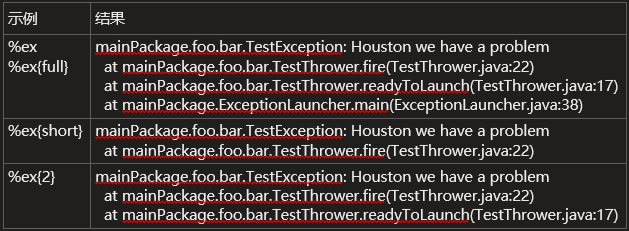
异常: 语法:
ex{depth}
exception{depth}
throwable{depth}

ex{depth, evaluator-1, ..., evaluator-n}
exception{depth, evaluator-1, ..., evaluator-n}
throwable{depth, evaluator-1, ..., evaluator-n}
含义/示例:输出与日志事件关联的异常的stacktrace信息,默认输出完整的stacktrace
-
属性:property
-
正则替换:replace(p){r,t} 将消息模式p中的r替换为t 如:
%replace(%logger %msg){'\.', '/'}将所有”.”替换为”/” -
MDC(Mapped Diagnostic Contex)字段:
%X{filedName} -
自定义转换词:
-
自定义实现 ClassicConverter,重写 convert(ILoggingEvent) 方法
javapublic class MySampleConverter extends ClassicConverter { long start = System.nanoTime(); @Override public String convert(ILoggingEvent event) { long nowInNanos = System.nanoTime(); return Long.toString(nowInNanos-start); } } -
声明转换词
xml<configuration> <conversionRule conversionWord="nanos" converterClass="chapters.layouts.MySampleConverter" /> <!-- … --> </configuration>
-
性能考虑,应避免使用的转换词
- 类名:C{length} / class
- 文件名:F / file
- 行号:L / line
- 方法名:M / method
- 包含jar包信息的异常stacktrace:xEx{depth} / xException{depth}… 及root异常顺序反转的 rEx{depth} / rootException{depth}…
4. 着色(Coloring)
基于ANSI颜色代码,Logback可使用颜色关键词来为分组设置颜色。内置了:“%highlight”,“%black”, “%red”, “%green”,“%yellow”,“%blue”, “%magenta”,“%cyan”, “%white”, “%gray”, “%boldRed”,“%boldGreen”, “%boldYellow”, “%boldBlue”, “%boldMagenta""%boldCyan”, “%boldWhite”
例:
<pattern>%d ${HOSTNAME} [%t] %highlight(%level) %logger{36} - %msg%n %ex{full}</pattern>
踩坑:官方说明使用 jansi 可以做到兼容不兼容ANSI的终端,但 Windows 下始终报错,即便引入了推荐版本 仍然报错
<dependency>
	<groupId>org.fusesource.jansi</groupId>
	<artifactId>jansi</artifactId>
	<version>1.17</version>
</dependency>
5.异步Appender
可通过声明AsyncAppender来执行异步日志打印,它只进行日志事件分发,因此必须引用另一个实际Appender才有意义
六、常见需求
-
根据环境变量动态附加Appender
参考:
How to select Logback appender based on property file or environment variable
-
使用 logback 官方支持的 语法,但同样需要引入 Janino library。参考:configuration
-
为 Appender 设置 ,并使用环境变量语法动态配置Filter的Level【有些曲线救国,应该仍有性能损耗
-
使用 SpringProfile
例:
yamlapplication.yaml spring: profiles: active: - ${ENV:classiclogs}xmllogback.xml <configuration> <!-- appender conf…--> <springProfile name="jsonlogs"> <root level="info"> <appender-ref ref="stdout-json" /> </root> </springProfile> <springProfile name="classiclogs"> <root level="info"> <appender-ref ref="stdout-classic" /> </root> </springProfile> </configuration>
-
七、踩坑
- 对于嵌套 .xml 配置文件,默认域”local”重复声明的话是无效的,不会覆盖。 比如在我的logback.xml中声明,无法覆盖Spring自带的配置。
控制附加器可加性的规则总结如下。
Appender Additivity 可加性
The output of a log statement of logger L will go to all the appenders in L and its ancestors. This is the meaning of the term “appender additivity”. loggerL的log语句的输出将转到L中的所有appender及其祖先。这就是术语“附加器可加性”的含义。
However, if an ancestor of logger L, say P, has the additivity flag set to false, then L’s output will be directed to all the appenders in L and its ancestors up to and including P but not the appenders in any of the ancestors of P. 然而,如果记录器L的祖先,比如P,具有设置为假的可加性标志,则L的输出将被定向到L中的所有附加器及其直到并包括P的祖先,但不定向到P的任何祖先中的附加器。
Loggers have their additivity flag set to true by default. 默认情况下,记录器的可加性标志设置为true。
然而,任何方法调用都涉及参数构造的“隐藏”成本。例如,对于某些记录器x写入,
x.debug("Entry number: " + i + "is " + entry[i]);参数构造的成本可能相当高,并且取决于所涉及的参数的大小。为了避免参数构造的成本,您可以利用SLF4J的参数化日志记录:
x.debug("Entry number: {} is {}", i, entry[i]);下面两行将产生完全相同的输出。然而,在禁用日志记录语句的情况下,第二个变体将比第一个变体的性能好至少30倍。
logger.debug("The new entry is "+entry+".");
logger.debug("The new entry is {}.", entry);
A two argument variant is also available. For example, you can write: 也可以使用两个参数的变体。例如,你可以这样写:
logger.debug("The new entry is {}. It replaces {}.", entry, oldEntry);If three or more arguments need to be passed, a varargs (Object…) variant is also available. For example, you can write: 如果需要传递三个或更多参数,则可以使用varargs(Object.)变体也可用。例如,你可以这样写:
logger.debug("Value {} was inserted between {} and {}.", newVal, below, above);Note that the varags variant incurs the cost of the creation of an Object[] instance. 注意,varags变量会导致创建Object[]实例的开销。
Assuming the configuration files logback-test.xml or logback.xml are not present, logback will default to invoking BasicConfigurator which will set up a minimal configuration. This minimal configuration consists of a ConsoleAppender attached to the root logger. The output is formatted using a PatternLayoutEncoder set to the pattern %d{HH:mm:ss.SSS} [%thread] %-5level %logger{36} -%kvp- %msg%n. Moreover, by default the root logger is assigned the DEBUG level. 假设配置文件logback-test.xml或logback.xml不存在,logback将默认调用Basicallator,这将设置最小配置。这个最小配置包括一个连接到根日志记录器的控制台日志记录器。使用模式%d{HH:mm:ss.SSS} [%thread] %-5level %logger{36} -%kvp- %msg%n设置的PatternLayoutEncoder格式化输出。此外,默认情况下,根日志记录器被分配了DEBUG级别。
在没有警告或错误的情况下,如果您仍然希望检查logback的内部状态,那么您可以通过调用StatusPrinter类的print()来指示logback打印状态数据。下面显示的MyApp2应用程序与MyApp1相同,只是增加了两行用于打印内部状态数据的代码。
// assume SLF4J is bound to logback in the current environment
LoggerContext lc = (LoggerContext) LoggerFactory.getILoggerFactory();
// print logback's internal status
StatusPrinter.print(lc);
Status data 状态数据 Enabling output of status data usually goes a long way in the diagnosis of issues with logback. 启用状态数据的输出通常在诊断logback问题方面有很大的帮助。 Enabling output of status data usually goes a long way in the diagnosis of issues with logback. Note that errors can also occur post-configuration, e.g. when a disk a full or log files cannot be archived due to permission errors. As such, it is highly recommended that you register a StatusListener as discussed below. 启用状态数据的输出通常在诊断logback问题方面有很大的帮助。请注意,错误也可能发生在配置后,例如,当磁盘已满或日志文件由于权限错误而无法存档时。因此,强烈建议您按照下面的讨论注册状态表。
The next example illustrates the installation of OnConsoleStatusListener. 下一个示例说明了OnConsoleStatusServer的安装。
<configuration>
   <!-- Recommendation: place status listeners towards the the top of the configuration file -->
   <statusListener class="ch.qos.logback.core.status.OnConsoleStatusListener" />

   <!-- ... the rest of the configuration file -->

</configuration>
顺便说一下,设置debug=“true”与安装OnConsoleStatusController是完全等效的,如前所示。
Automatically reloading configuration file upon modification
修改后自动重新加载配置文件
Logback-classic can scan for changes in its configuration file and automatically reconfigure itself when the configuration file changes.
Logback-classic可以扫描其配置文件中的更改,并在配置文件更改时自动重新配置自己。
If instructed to do so, logback-classic will scan for changes in its configuration file and automatically reconfigure itself when the configuration file changes. In order to instruct logback-classic to scan for changes in its configuration file and to automatically re-configure itself set the scan attribute of the
Example: Scanning for changes in configuration file and automatic re-configuration (logback-examples/src/main/resources/chapters/configuration/scan1.xml) 示例:扫描配置更改 文件和自动重新配置 (logback-examples/src/main/resources/chapters/configuration/scan1.xml)
Example: Specifying a different scanning period (logback-examples/src/main/resources/chapters/configuration/scan2.xml) 示例:设置不同的扫描周期 (logback-examples/src/main/resources/chapters/configuration/scan2.xml)
Behind the scenes, when you set the scan attribute to true, a ReconfigureOnChangeTask will be installed. This task run in a separate thread and will check whether your configuration file has changed. ReconfigureOnChangeTask will automatically watch for any included files as well. 在后台,当您将scan属性设置为true时,将安装ReconfigureOnChangeTask。此任务在一个单独的线程中运行,并将检查您的配置文件是否已更改。ReconfigureOnChangeTask也会自动监视任何包含的文件。
As it is easy to make errors while editing a configuration file, in case the latest version of the configuration file has XML syntax errors, it will fall back to a previous configuration file free of XML syntax errors. 由于在编辑配置文件时很容易出错,如果最新版本的配置文件有XML语法错误,它将回退到没有XML语法错误的前一个配置文件。
Stopping logback-classic 停止logback-classic In order to release the resources used by logback-classic, it is always a good idea to stop the logback context. Stopping the context will close all appenders attached to loggers defined by the context and stop any active threads in an orderly way. Please also read the section on “shutdown hooks” just below. 为了释放logback-classic使用的资源,最好停止logback上下文。停止上下文将关闭所有附加到由上下文定义的记录器的附加器,并以有序的方式停止任何活动线程。也请阅读下面关于“关机挂钩”的部分。
import org.sflf4j.LoggerFactory; import ch.qos.logback.classic.LoggerContext; …
// assume SLF4J is bound to logback-classic in the current environment LoggerContext loggerContext = (LoggerContext) LoggerFactory.getILoggerFactory(); loggerContext.stop(); In web-applications the above code could be invoked from within the contextDestroyed method of ServletContextListener in order to stop logback-classic and release resources. Starting with version 1.1.10, the appropriate ServletContextListener is installed automatically for you (see just below). 在Web应用程序中,上述代码可以从Servlet的contextDestroyed方法中调用,以停止logback-classic并释放资源。从版本1.1.10开始,将自动为您安装相应的ServletContextController(请参阅下文)。
Stopping logback-classic via a shutdown hook 通过关闭钩子停止logback-classic Installing a JVM shutdown hook is a convenient way for shutting down logback and releasing associated resources. 安装JVM关闭钩子是关闭logback和释放相关资源的一种方便方法。
Legacy 遗产Canonical (1.3) Canonical(1.3)Tyler 泰勒
The default shutdown hook, namely DefaultShutdownHook, will stop the logback context after a specified delay (0 by default). Stopping the context will allow up to 30 seconds for any log file compression tasks running in the background to finish. In standalone Java applications, adding a
As of version 1.5.7, installing a shutdown hook will replace the previously installed hook. Thus, at most one logback shutdown hook can be installed via the usual logback.xml configuraiton. 从版本1.5.7开始,安装关闭钩子将替换以前安装的钩子。因此,最多只能通过常用的logback.xml配置文件安装一个logback关闭钩子。
Variable substitution 变量替换 NOTE Earlier versions of this document used the term “property substitution” instead of the term “variable”. Please consider both terms interchangeable although the latter term conveys a clearer meaning. 注意本文档的早期版本使用术语“属性替换”而不是术语“变量”。请考虑这两个术语可以互换,尽管后一术语的含义更明确。
As in many scripting languages, logback configuration files support definition and substitution of variables. Variables have a scope (see below). Moreover, variables can be defined within the configuration file itself, in an external file, in an external resource or even computed and defined on the fly. 与许多脚本语言一样,logback配置文件支持变量的定义和替换。变量有作用域(见下文)。此外,变量可以在配置文件本身、外部文件、外部资源中定义,甚至可以在运行中计算和定义。
Variable substitution can occur at any point in a configuration file where a value can be specified. 变量替换可以发生在配置文件中可以指定值的任何位置。 Variable substitution can occur at any point in a configuration file where a value can be specified. The syntax of variable substitution is similar to that of Unix shells. The string between an opening ${ and closing } is interpreted as a reference to the value of the property. For property aName, the string ”${aName}” will be replaced with the value held by the aName property. 变量替换可以发生在配置文件中可以指定值的任何位置。变量替换的语法类似于Unix shell。开头${和结尾}之间的字符串被解释为对属性值的引用。对于属性aName,字符串“${aName}”将替换为aName属性所包含的值。
As they often come in handy, the HOSTNAME and CONTEXT_NAME variables are automatically defined and have context scope. Given that in some environments it may take some time to compute the hostname, its value is computed lazily (only when needed). Moreover, HOSTNAME can be set from within the configuration directly. 因为它们经常派上用场,HOSTNAME和CONTEXT_NAME变量是自动定义的,并且具有上下文作用域。考虑到在某些环境中可能需要一些时间来计算主机名,因此它的值是延迟计算的(仅在需要时)。此外,可以直接在配置中设置HOSTNAME。
Defining variables 定义变量
Variables can be defined one at a time in the configuration file itself or loaded wholesale from an external properties file or an external resource. For historical reasons, the XML element for defining variables is
The next example shows a variable declared at the beginning of the configuration file. It is then used further down the file to specify the location of the output file. 下一个示例显示在配置文件开头声明的变量。然后在文件的更下方使用它来指定输出文件的位置。
Example: Simple Variable substitution (logback-examples/src/main/resources/chapters/configuration/variableSubstitution1.xml)
示例:简单变量替换 (logback-examples/src/main/resources/chapters/configuration/variableSubstitution1.xml)
Legacy 遗产Canonical (1.3) Canonical(1.3)Tyler 泰勒
<configuration>

  <variable name="USER_HOME" value="/home/sebastien" />

  <appender name="FILE" class="ch.qos.logback.core.FileAppender">
    <file>${USER_HOME}/myApp.log</file>
    <encoder>
      <pattern>%kvp %msg%n</pattern>
    </encoder>
  </appender>

  <root level="debug">
    <appender-ref ref="FILE" />
  </root>
</configuration>
When multiple variables are needed, it may be more convenient to create a separate file that will contain all the variables. Here is how one can do such a setup. 当需要多个变量时,创建一个包含所有变量的单独文件可能更方便。这里是如何做这样的设置。
Example: Variable substitution using a separate file (logback-examples/src/main/resources/chapters/configuration/variableSubstitution3.xml)
示例:使用 单独的文件 (logback-examples/src/main/resources/chapters/configuration/variableSubstitution3.xml)
Legacy 遗产Canonical (1.3) Canonical(1.3)Tyler 泰勒
<configuration>

  <variable file="src/main/java/chapters/configuration/variables1.properties" />

  <appender name="FILE" class="ch.qos.logback.core.FileAppender">
     <file>${USER_HOME}/myApp.log</file>
     <encoder>
       <pattern>%kvp %msg%n</pattern>
     </encoder>
   </appender>

   <root level="debug">
     <appender-ref ref="FILE" />
   </root>
</configuration>
此配置文件包含对名为variables1.properties的文件的引用。该文件中包含的变量将被读取,然后在局部范围内定义。下面是variable.properties文件的样子。
Example: Variable file (logback-examples/src/main/resources/chapters/configuration/variables1.properties)
USER_HOME=/home/sebastienYou may also reference a resource on the class path instead of a file. 也可以引用类路径上的资源而不是文件。
<configuration>

  <variable resource="resource1.properties" />

  <appender name="FILE" class="ch.qos.logback.core.FileAppender">
     <file>${USER_HOME}/myApp.log</file>
     <encoder>
       <pattern>%kvp %msg%n</pattern>
     </encoder>
   </appender>

   <root level="debug">
     <appender-ref ref="FILE" />
   </root>
</configuration>
Default values for variables 变量的默认值
Under certain circumstances, it may be desirable for a variable to have a default value if it is not declared or its value is null. As in the Bash shell, default values can be specified using the ":-" operator. For example, assuming the variable named aName is not defined, "${aName:-golden}" will be interpreted as "golden".
在某些情况下,如果变量未声明或其值为null,则可能需要变量具有默认值。与在Bash shell中一样,可以使用“:-”操作符指定默认值。例如,假设未定义名为aName的变量,则“${aName:-golden}”将被解释为“golden”。
value nesting 值嵌套 The value definition of a variable can contain references to other variables. Suppose you wish to use variables to specify not only the destination directory but also the file name, and combine those two variables in a third variable called “destination”. The properties file shown below gives an example. 变量的值定义可以包含对其他变量的引用。假设您希望使用变量不仅指定目标目录,还指定文件名,并将这两个变量联合收割机组合到第三个变量“destination”中。下面显示的属性文件给出了一个示例。
Example: Nested variable references
   (logback-examples/src/main/resources/chapters/configuration/variables2.properties)
示例:嵌套变量引用
   (logback-examples/ src/main/resources/ chapters/configuration/variables2.properties)

USER_HOME=/home/sebastien
fileName=myApp.log
destination=${USER_HOME}/${fileName}name nesting 名字嵌套
When referencing a variable, the variable name may contain a reference to another variable. For example, if the variable named "userid" is assigned the value "alice", then "${${userid}.password}" references the variable with the name "alice.password".
当引用一个变量时,变量名可能包含对另一个变量的引用。例如,如果名为“userid”的变量被赋以值“alice”,则“${${userid}.password}”引用名为“alice.password”的变量。
default value nesting 缺省值嵌套
The default value of a variable can reference another variable. For example, assuming the variable 'id' is unassigned and the variable 'userid' is assigned the value "alice", then the expression "${id:-${userid}}" will return "alice".
一个变量的默认值可以引用另一个变量。例如,假设变量“id”未赋值,变量“userid”赋值为“alice”,则表达式“${id:- ${userid}}”将返回“alice”。HOSTNAME property HOSTNAME属性 As it often comes in handy, the HOSTNAME property is defined automatically during configuration with context scope. 由于HOSTNAME属性经常派上用场,因此它是在配置上下文作用域期间自动定义的。
CONTEXT_NAME property CONTEXT_NAME属性 As its name indicates, the CONTEXT_NAME property corresponds to the name of the current logging context. 正如其名称所示,CONTEXT_NAME属性对应于当前日志记录上下文的名称。
Defining variables, aka properties, on the fly
动态定义变量,也就是属性
You may define properties dynamically using the
Here is an example. 下面是一个例子。
Legacy 遗产Canonical (1.3) Canonical(1.3)Tyler 泰勒
At the present time, logback ships with some fairly simple implementations of PropertyDefiner. 目前,logback附带了一些相当简单的PropertyDefiner实现。
| Implementation name 实现名称 | Description 描述 |
|---|---|
| CanonicalHostNamePropertyDefiner | Set the named variable to the canonical host name of the local host. Note that obtaining the canonical host name may take several seconds.将命名变量设置为本地主机的规范主机名。请注意,获取规范主机名可能需要几秒钟的时间。 |
| FileExistsPropertyDefiner | Set the named variable to “true” if the file specified by path property exists, to “false” otherwise.如果path属性指定的文件存在,则将命名变量设置为“true”,否则设置为“false”。 |
| ResourceExistsPropertyDefiner | Set the named variable to “true” if the resource specified by the user is available on the class path, to “false” otherwise.如果用户指定的资源在类路径上可用,则将命名变量设置为“true”,否则设置为“false”。 |
File inclusion 文件包含
Joran supports including parts of a configuration file from another file. This is done by declaring a
Example: File include (logback-examples/src/main/resources/chapters/configuration/containingConfig.xml) 示例:文件包含 (logback-examples/ src/main/resources/ chapters/configuration/ containingConfig. xml)
Legacy 遗产Canonical (1.3) Canonical(1.3)Tyler 泰勒
<configuration>
  <include file="src/main/java/chapters/configuration/includedConfig.xml"/>

  <root level="DEBUG">
    <appender-ref ref="includedConsole" />
  </root>

</configuration>
The target file MUST have its elements nested inside an
Example: File include (logback-examples/src/main/resources/chapters/configuration/includedConfig.xml) 示例:文件包含 (logback-examples/ src/main/resources/ chapters/configuration/ includedConfig. xml)
<included>
  <appender name="includedConsole" class="ch.qos.logback.core.ConsoleAppender">
    <encoder>
      <pattern>"%d -%kvp- %m%n"</pattern>
    </encoder>
  </appender>
</included>
The contents to include can be referenced as a file, as a resource, or as a URL. 要包含的内容可以作为文件、资源或URL引用。
As a file: 作为一个文件: To include a file use the file attribute. You can use relative paths but note that the current directory is defined by the application and is not necessarily related to the path of the configuration file. 要包含文件,请使用file属性。可以使用相对路径, 注意,当前目录由应用程序定义, 不一定与配置的路径相关 文件. As a resource: 作为资源: To include a resource, i.e a file found on the class path, use the resource attribute. 要包含一个资源,即 文件,使用resource属性。
<include optional=“true” …/>
PropertiesConfigurator Properties Configurator的 SINCE 1.5.8 The PropertiesConfigurator can read a properties file to set logger levels. 从1.5.8开始,属性记录器可以读取属性文件来设置记录器级别。
As the scope of PropertiesConfigurator is limited to setting levels of loggers, the syntax of the properties file is simple. 由于属性文件的作用域仅限于设置记录器的级别,因此属性文件的语法很简单。
# defines aKey set to aValue
aKey=aValue
# sets the level of the root logger to 'LEVEL'
logback.root=LEVEL
# sets the logger named 'LOGGER_NAME' to 'LEVEL'
logback.logger.LOGGER_NAME=LEVEL
where LOGGER_NAME is a logger name and LEVEL is one of the level values for configuring loggers. 其中,LOGGER_NAME是记录器名称,LEVEL是配置记录器的级别值之一。
Note that variable substitution is allowed. 请注意,允许变量替换。
Here is a sample .properties file: 下面是一个示例.properties文件:
logback.root = INFO

com_foo_level = DEBUG

logback.logger.org.xyz.http = TRACE
logback.logger.org.xyz.database = ERROR
logback.com.foo = ${com_foo_level}
The location of .properties file is declared via the
Legacy 遗产Canonical (1.3) Canonical(1.3)Tyler 泰勒
<!-- rest of the configuration file .... -->Uniquely named files (by timestamp)
During the application development phase or in the case of short-lived applications, e.g. batch applications, it is desirable to create a new log file at each new application launch. This is fairly easy to do with the help of the
Example: Uniquely named FileAppender configuration by timestamp (logback-examples/src/main/resources/chapters/appenders/conf/logback-timestamp.xml) 示例:唯一命名的FileServer 按时间戳配置 (logback-examples/ src/main/resources/ chapters/appenders/ conf/logback-timestamp. xml)
Legacy 遗产Canonical (1.3) Canonical(1.3)Tyler 泰勒
Experiment with the
java chapters.appenders.ConfigurationTester src/main/resources/chapters/appenders/conf/logback-timestamp.xml To use the logger context birthdate as time reference, you would set the timeReference attribute to “contextBirth” as shown below. 要使用记录器上下文birthdate作为时间参考,您需要将timeReference属性设置为“contextBirth”,如下所示。
Example: Timestamp using context birthdate as time reference (logback-examples/src/main/resources/chapters/appenders/conf/logback-timestamp-contextBirth.xml) 示例:使用上下文birthdate作为时间参考的时间戳 (logback-examples/ src/main/resources/ chapters/appenders/ conf/logback-timestamp-contextBirth. xml)
<configuration>
  <timestamp key="bySecond" datePattern="yyyyMMdd'T'HHmmss"
             timeReference="contextBirth"/>
  ...
</configuration>
checkIncrement 检查增量 Duration SINCE 1.3.12/1.4.12 Given that checking for file size is a relatively costly operation, by default it is performed once every 60 seconds. However, you can set a different check increment as a duration. 由于1.3.12/1.4.12鉴于检查文件大小是一个相对昂贵的操作,默认情况下,它每60秒执行一次。但是,您可以将不同的检查增量设置为持续时间。
Restrictions on literals immediately following conversion words 对紧跟在转换词之后的文字的限制 In most cases literals naturally contain spaces or other delimiting characters so that they are not confused with conversion words. For example, the pattern “%level [%thread] - %message%n” contains the string literals ” [” and ”] - ”. However, if a character which can be part of a java identifier immediately follows a conversion word, logback”s pattern parser will be fooled into thinking that the literal is part of the conversion word. For example, the pattern “%date%nHello” will be interpreted as two conversion words %date and %nHello and since %nHello is not a known conversion word, logback will output %PARSER_ERROR[nHello] for %nHello. If you wish the string literal “Hello” to immediately separate %n and Hello, pass an empty argument list to %n. For example, “%date%n{}Hello” will be interpreted as %date followed by %n followed by the literal “Hello”. 在大多数情况下,字面量自然包含空格或其他分隔字符,以便它们不会与转换词混淆。例如,模式“%level [%thread] - %message%n”包含字符串文字“[”和“]-“。然而,如果一个可以作为java标识符的一部分的字符紧跟在转换字之后,logback的模式解析器将被愚弄,认为该文字是转换字的一部分。例如,模式“%date%nHello“将被解释为两个转换词%date和%nHello,由于%nHello不是已知的转换词,logback将为%nHello输出%PARSER_ERROR[nHello]。如果您希望字符串字面量“Hello”立即分隔%n和Hello,请将空参数列表传递给%n。例如,“%date%n{} Hello”将被解释为%date后跟% n,后跟文字“Hello”。
<layout class="ch.qos.logback.classic.html.HTMLLayout">
  <pattern>%relative...%msg</;pattern>
  <cssBuilder class="ch.qos.logback.classic.html.UrlCssBuilder">
    <!-- url where the css file is located -->
    <url>http://...</url>
  </cssBuilder>
</layout>
评论
评论区加载中
正在获取评论,请稍候。