
自定义抛出物体
组件名称:ParabolaFly(抛物线飞行)
组件名称:ParabolaFly(抛物线飞行)
属性命名(props)
属性(Props)
| 属性名 | 类型 | 默认值 | 必填 | 说明 |
|---|---|---|---|---|
| start | Object { x: number, y: number } | — | ✅ 是 | 飞行起点坐标(相对于窗口或容器的坐标系) |
| end | Object { x: number, y: number } | — | ✅ 是 | 飞行终点坐标 |
| peakHeight | Number | 100 | 否 | 抛物线的最高点高度,数值越大弧线越高 |
| speed | Number | 600 | 否 | 飞行速度,单位像素/秒(或倍率因子) |
| showTrail | Boolean | true | 否 | 是否启用轨迹点绘制 |
| showTrailOption.time | Number | 1000 | 否 | 单个轨迹点存在的时间(毫秒) |
| showTrailOption.gap | Number | 1 | 否 | 绘制轨迹点的间隔(数值越大,轨迹越稀疏) |
| showTrailOption.maxNum | Number | 10 | 否 | 同时存在的最大轨迹点数,超过则移除最旧的点 |
插槽(Slots)
| 插槽名 | 类型 | 默认值 | 说明 |
|---|---|---|---|
| default | VNode / Function | — | 飞行主体的内容,例如一个图标组件或图片 |
| detail | VNode / Function | 默认圆点(直径 6px,灰色半透明圆) | 自定义轨迹点的渲染方式,例如小方块、小星星等 |
Fly.show(options) 参数表
| 参数名 | 类型 | 必填 | 默认值 | 说明 |
|---|---|---|---|---|
| start | Object { x: number, y: number } | ✅ | — | 飞行起点坐标(相对于窗口或容器的坐标) |
| end | Object { x: number, y: number } | ✅ | — | 飞行终点坐标 |
| content | VNode / Function | ❌ | — | 飞行主体内容(通常是一个组件或 DOM 节点),例如 () => h(MyIcon) |
| peakHeight | Number | ❌ | 100 | 抛物线的最高点高度,数值越大弧线越高 |
| speed | Number | ❌ | 600 | 飞行速度,单位:像素/秒(或倍率因子) |
| showTrail | Boolean | ❌ | true | 是否启用轨迹点绘制 |
| detail | VNode / Function | ❌ | 默认小圆点 | 自定义轨迹点的渲染方式,例如星形、方块 |
| showTrailOption | Object { time, gap, maxNum } | ❌ | { time: 1000, gap: 1, maxNum: 10 } | 轨迹点控制参数 |
├─ time | Number | ❌ | 1000 | 单个轨迹点的存在时间(毫秒) |
├─ gap | Number | ❌ | 1 | 绘制轨迹点的间隔(数值越大,轨迹越稀疏) |
└─ maxNum | Number | ❌ | 10 | 同时存在的最大轨迹点数量,超出会移除最旧的点 |
传入模板使用方式:
js
用法一:传字符串/HTML
Fly.show({
  start: { x: 100, y: 100 },
  end: { x: 400, y: 400 },
  content: () => h('div', { style: 'width:20px;height:20px;background:red;border-radius:50%;' })
})

用法二:传组件
<!-- MyIcon.vue -->
<template>
  <div class="w-8 h-8 bg-blue-500 rounded-full"></div>
</template>

import MyIcon from './MyIcon.vue'

Fly.show({
  start: { x: 100, y: 100 },
  end: { x: 400, y: 400 },
  content: () => h(MyIcon)   // ✅ slot 用组件
})

用法三:传动态文本
Fly.show({
  start: { x: 50, y: 50 },
  end: { x: 300, y: 200 },
  content: () => '🔥'
})动画实现层面的关键区别:
1.
left/top改变坐标
- 原理:不断修改
style.left/style.top数值。- 优点:逻辑直观,直接对应坐标。
- 缺点:
- 每次修改都会触发 layout(回流) → 性能差,特别是频繁动画时。
- 可能影响兄弟元素的布局(虽然
absolute/fixed一般影响较小)。
2.
transform: translate(x, y)改变坐标
- 原理:元素保持一个“基准位置”,通过
transform: translate()偏移。- 优点:
- 由 GPU 加速,通常只触发 composite(合成层绘制),性能更好,不卡顿。
- 不会触发回流,不影响其它元素布局。
- 可以和
scale/rotate等结合。- 缺点:
- 计算逻辑稍微复杂一点(需要基准点 + 偏移量)。
left/top一般需要配合0,否则坐标基准不直观。
实际推荐方案
✅ 现代动画推荐用
transform: translate(x, y),尤其是抛物线飞行这种帧率要求高的效果。
时间计算
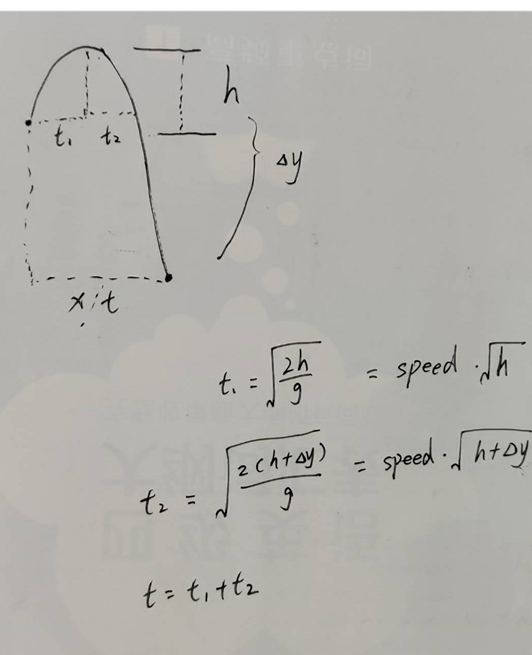
垂直方向第一段位移:
translateY(-h)/transition:translateY t1
垂直方向第二段位移:
translateY(h+y)/transition:translateY t2
水平方向位移:
translateX(x)/transition:translateX t1+t2
speed作为分母,因为一般取一个比较大的
具体实现
fly/index.js
js
import { createApp, h } from 'vue'
import ParabolaFly from './ParabolaFly.vue'

function showFly(options) {
  const container = document.createElement('div')
  document.body.appendChild(container)

  const { content,detail, ...rest } = options
  const slots = {}
  if (content) slots.default = () => (typeof content === 'function' ? content() : content)
  if (detail)  slots.detail  = () => (typeof detail  === 'function' ? detail()  : detail)
  const app = createApp({
    render() {
      return h(
        ParabolaFly,
        {
          ...rest,
          onEnd: () => {
            app.unmount()
            document.body.removeChild(container)
          }
        },
        slots
      )
    }
  })

  app.mount(container)
}

export const Fly = {
  install(app) {
    app.config.globalProperties.$fly = showFly
  },
  show: showFly
}
fly/ParabolaFly.vue
vue
<template>
  <div ref="outer" @transitionend.self="handleOuter"
    :style="{ position: 'fixed', left: `${start.x}px`, top: `${start.y}px`, pointerEvents: 'none' }">
    <div ref="inner" @transitionend.self.once="handleInner">
      <slot>
        <div style="width: 50px;height: 50px;background-color: red;border-radius: 10px;"></div>
      </slot>
    </div>
  </div>
</template>

<script setup>
import { computed, onMounted, ref, nextTick, useSlots, createApp } from 'vue';
const slots = useSlots()
const outer = ref(null)
const inner = ref(null)
const destroyed = ref(false)

const emit = defineEmits(['end'])
const props = defineProps({
  /** 起点坐标 { x: number, y: number } */
  start: {
    type: Object,
    required: true
  },
  /** 终点坐标 { x: number, y: number } */
  end: {
    type: Object,
    required: true
  },
  /** 抛物线最高点高度,默认 100 */
  peakHeight: {
    type: Number,
    default: 100
  },
  /** 飞行速度(像素/秒 或一个倍率),默认 600 */
  speed: {
    type: Number,
    default: 30
  },
  /** 是否显示轨迹点 */
  showTrail: {
    type: Boolean,
    default: true
  },
  /** 轨迹点展示时间 ms */
  showTrailOption: {
    type: Object,
    default: {
      time: 1000,
      gap: 5,
      maxNum: 20
    }
  }
})
onMounted(() => {
  // console.log('ParabolaFly props:', props);
  // console.log('t1:', t1.value, 't2:', t2.value, 'totalTime:', totalTime.value);
  requestAnimationFrame(() => {
    // 内层控制竖直
    inner.value.style.transition = `transform ${t1.value}ms ease-out`
    inner.value.style.transform = `translateY(-${props.peakHeight}px)`
    // 外层控制水平
    outer.value.style.transition = `transform ${totalTime.value}ms linear`
    outer.value.style.transform = `translateX(${dx.value}px)`
    requestAnimationFrame(createTrail())
  })
})
function createTrail() {
  let count = props.showTrailOption.gap || 1
  const trailQueue = [] // ✅ 用数组保存轨迹点

  function draw() {
    if (destroyed.value) {
      while (trailQueue.length > 0) {
        const old = trailQueue.shift()
        if (old.__app__) old.__app__.unmount()
        old.remove()
      }
      return
    }

    if (--count <= 0) {
      count = props.showTrailOption.gap || 1

      if (props.showTrail && outer.value && inner.value) {
        const outerRect = outer.value.getBoundingClientRect()
        const innerRect = inner.value.getBoundingClientRect()

        const container = document.createElement('div')
        container.style.position = 'fixed'
        container.style.left = `${outerRect.x + outer.value.offsetWidth / 2}px`
        container.style.top = `${innerRect.y + outer.value.offsetHeight / 2}px`
        container.style.transform = 'translate(-50%, -50%)'
        container.style.pointerEvents = 'none'

        if (!slots.detail || slots.detail().length === 0) {
          // 默认轨迹点
          container.style.width = '6px'
          container.style.height = '6px'
          container.style.background = 'rgba(0,0,0,0.3)'
          container.style.borderRadius = '50%'
          document.body.appendChild(container)
        } else {
          // 自定义轨迹组件
          document.body.appendChild(container)
          const app = createApp({
            render: () => slots.detail()
          })
          app.mount(container)
          container.__app__ = app // ✅ 绑定引用,方便销毁
        }

        // 放入队列
        trailQueue.push(container)

        // 超过最大数量 → 移除最前面的
        const maxNum = props.showTrailOption.maxNum || 10
        if (trailQueue.length > maxNum) {
          const old = trailQueue.shift()
          if (old.__app__) old.__app__.unmount()
          old.remove()
        }

        // 定时删除(可选,不删也行,纯靠队列控制)
        setTimeout(() => {
          if (container.parentNode) {
            if (container.__app__) container.__app__.unmount()
            container.remove()
          }
        }, props.showTrailOption.time || 1000)
      }
    }

    requestAnimationFrame(draw)
  }

  return draw
}


function handleOuter(e) {
  // console.log('水平过渡结束', e);
  destroyed.value = true
  emit('end')
}
function handleInner(e) {
  // console.log("垂直动画结束!!!", e);
  // 内层控制竖直
  inner.value.style.transition = `transform ${t2.value}ms ease-in`
  inner.value.style.transform = `translateY(${props.peakHeight + dy.value}px)`
}
const t1 = computed(() => {
  // console.log(props.peakHeight);
  return Math.sqrt(props.peakHeight) / props.speed * 1000
})
const t2 = computed(() => {
  return Math.sqrt(props.peakHeight + dy.value) / props.speed * 1000
})
const totalTime = computed(() => {
  return (t1.value + t2.value)
})
const dx = computed(() => {
  return props.end.x - props.start.x
})
const dy = computed(() => {
  return props.end.y - props.start.y
})
</script>
main.ts
ts
import { Fly } from './fly'
const app = createApp(App)
app.use(Fly)
app.mount('#app')
App.vue(使用)
css
function handleClick() {
  Fly.show({
    start: { x: 100, y: 200 },
    end: { x: 800, y: 400 },
    peakHeight: 200,
    speed: 30,
    showTrail: true,
    showTrailOption: {
      time: 500,
      gap: 10,
      maxNum: 200
    },
    detail: () => h('div', {
  style: `
    width: 20px;
    height: 20px;
    background-color: green;
    clip-path: polygon(
      50% 0%,
      61% 35%,
      98% 35%,
      68% 57%,
      79% 91%,
      50% 70%,
      21% 91%,
      32% 57%,
      2% 35%,
      39% 35%
    );
  `
})
})
}
评论
评论加载中……